
Free WordPress plugin · Unused Image Cleaner
Find unused images in minutes, not hours.
Unused Image Cleaner by Discounly reads your whole site — pages, products, page builders, settings and plugin tables — and lists every Media Library image that nothing uses. You check them, then move them to the Trash.
Version 4.2.0 · 37 KB · GPLv2 · available on WordPress.org
≈ 2 min
to scan 5,105 images and 1.9M database rows
Read-only
scan — nothing changes until you choose
10 at a time
check the results yourself
$0
every feature, no Pro version
The problem
Your Media Library keeps every image you ever uploaded
Replaced product photos, old page designs, duplicate uploads, images from deleted posts. WordPress also makes several resized copies of every upload, so a few thousand images quickly become tens of thousands of files — taking up disk space, bloating backups and making the Media Library hard to work with.
Most cleaners search your database once for every single image. On a large site that is thousands of slow searches, and a scan can run for hours or time out. That is why we built Unused Image Cleaner.
One real site, measured
Scanned in about 2 minutes
The solution
One fast pass. Then you decide.
Discounly Unused Image Cleaner reads your database once, builds an index of every image reference, then checks each image against it — and it is strict about what counts as “used”.
- One read, one pass. The database is read once in chunks; every image is then checked against the index.
- Full paths, not just names.
2023/05/banner.pngand2021/02/banner.pngare different images. - Every size counts. A page that shows
photo-300x200.jpgkeepsphoto.jpg. Scaled and edited versions are recognised. - Numbers only count where an image ID belongs — image fields, galleries, blocks. Quiz IDs, prices and view counts are ignored.
- Live content only. Old revisions and trashed posts don’t keep an image; drafts, private and scheduled posts do.
- When in doubt, it keeps the image. Caches and old cleaner catalogs that list every file are not treated as real use.
How it works
How Unused Image Cleaner works in four steps
Everything in Unused Image Cleaner happens under Media → Unused Images. You see every result before anything is removed.
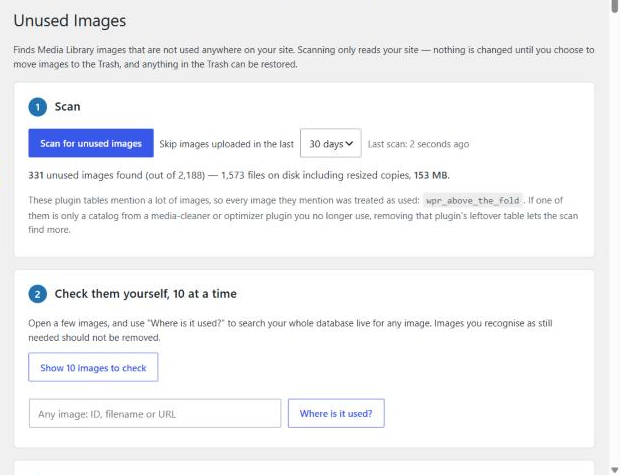
Scan
One click. The scan reads every place your site can use an image and lists the images nothing points to. It only reads — nothing is changed.
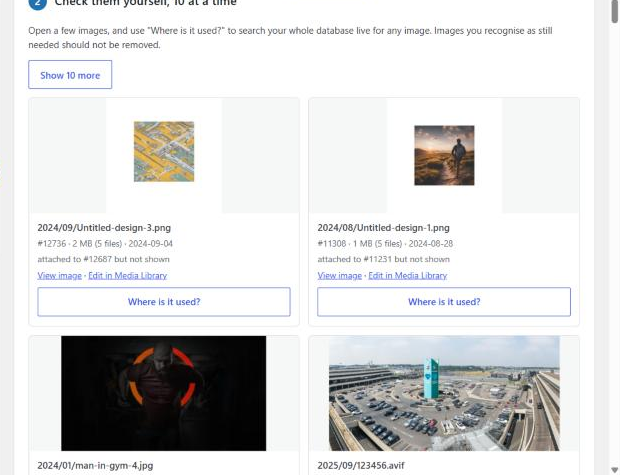
Check them, 10 at a time
See a preview, path, size and upload date for 10 images at a time, picked from across the whole list, with links to the image and its Media Library page.
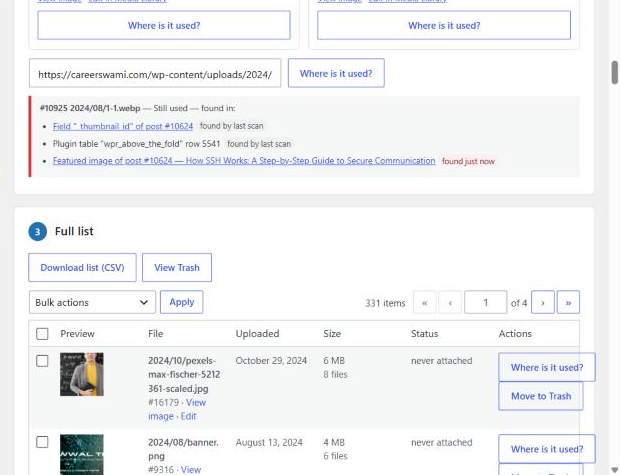
Ask “Where is it used?”
Type any image ID, file name or URL. You get every place it is used, with links — from the last scan plus a live re-check of pages, products and settings.
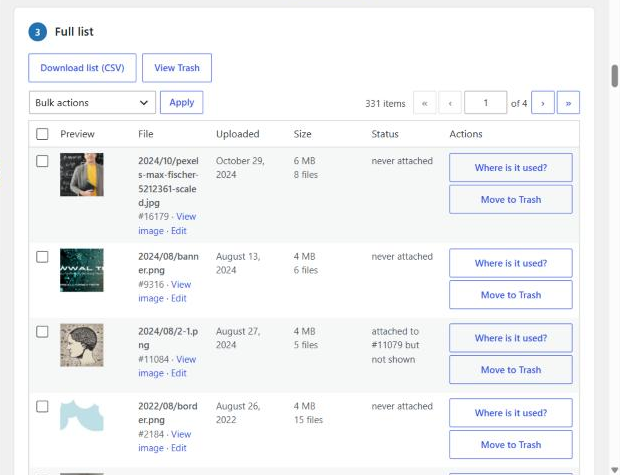
Move to Trash
The full list, largest first, with a CSV download. Removal always goes to the Trash, each file is re-checked right before it moves, and you can restore anything.
Where it looks
Every place WordPress can use an image
If Unused Image Cleaner finds an image in any of these places, the image is kept.
Posts, pages & products
Content, excerpts and editor data, including Web Stories.
Page builders & custom fields
Elementor and any builder that stores JSON or serialized data.
Featured images & galleries
WooCommerce product galleries, category and tag images.
Theme & site settings
Customizer, site logo and icon, widgets and plugin settings.
Other plugin tables
LearnDash quiz questions and any plugin’s own database tables.
Users, comments & reviews
User profiles, comments and product reviews.
Theme & CSS files
Theme files, must-use plugins and generated Elementor and Astra CSS.
Media that uses media
A video’s poster or a file’s featured image.
Built for big sites
Minutes, not hours
Scanners that search the database once for every image slow down badly as a site grows. Unused Image Cleaner reads your database once, about 20 seconds per request, builds an index of every image reference, then checks each image against it in a single pass. Close the tab and the scan picks up where it left off.
Safe by design
You stay in control
Unused Image Cleaner is built so a mistake is always reversible.
Scanning only reads
Nothing on your site changes until you choose to move images to the Trash.
Trash first, always
Restore from the plugin’s own Trash view. It refuses to run if your site’s Trash is turned off.
Re-checked before it moves
Each file is fingerprinted during the scan. A file that changed since then is skipped.
Nothing leaves your site
No external requests, no tracking, no account. Uninstalling removes its own tables.
Get started
Install Unused Image Cleaner in three steps
Download the zip
Install it from the WordPress.org plugin directory, or fill in the short form below and the zip downloads as soon as you submit.
Install & activate
In WordPress go to Plugins → Add New, search for “Discounly Unused Image Cleaner”, click Install Now, then Activate. Downloaded the zip? Use Upload Plugin instead.
Scan
Open Media → Unused Images and click “Scan for unused images”. Keep a recent backup before removing anything.
Pricing
Everything free. No catch.
Unused Image Cleaner has no Pro version, no limits on how many images you can scan or clean, no licence key and no ads. Every feature on this page is in the free download.
- Fast one-pass scan
- 10-at-a-time review
- “Where is it used?” for any image
- CSV export of the full list
- Trash view with restore
- Updates included
Discounly Unused Image Cleaner 4.2.0 · WordPress 6.2+ · PHP 7.4+ · GPLv2
Like it? Our ten premium plugins open on Black Friday — see them →
FAQ
Questions, answered
Does Unused Image Cleaner change anything on my site?
No. Unused Image Cleaner only reads your site while it scans. Nothing changes until you choose to move images to the Trash.
Is it safe to delete what it finds?
The plugin is careful and keeps an image whenever it isn’t sure, but no scanner can see images used outside your site — in emails, newsletters, social posts or other websites. Use “Where is it used?” and the 10-at-a-time check, keep a recent backup, and move images to the Trash rather than deleting them.
Where do trashed images go? Can I get them back?
They go to the WordPress Trash. Open View Trash on the plugin page to restore them or delete them permanently. WordPress empties the Trash automatically after 30 days (the EMPTY_TRASH_DAYS setting). If your site has the Trash turned off, the plugin refuses to move images, because they would be deleted permanently.
How fast is Unused Image Cleaner on a large site?
On a real site with 5,105 images (35,685 image files including resized copies), 240,000 posts and 1.9 million custom-field rows, a full scan took about 2 minutes. The scan reads your database once in chunks and checks every image against an index in one pass.
Will the scan slow my site down?
The scan runs only when you click Scan, one request at a time, and only while the page is open. Each request works for up to about 20 seconds. To make requests shorter, add define( 'DISCOUNLY_UIC_STEP_SECONDS', 10 ); to wp-config.php.
Does it work with Elementor and other page builders?
Yes. It reads the data Elementor and similar builders store — JSON and serialized settings, including image IDs and URLs. Other builders that store image URLs or IDs in post content or custom fields are covered by the same rules.
Why are photo.jpg and photo.webp treated separately?
They are separate uploads in your Media Library. If a page shows photo.webp, the separate photo.jpg upload is not used by that page. Copies made automatically by WebP converters (photo.jpg.webp) are recognised as belonging to the original.
Is Unused Image Cleaner really free? Is there a Pro version?
Yes, Unused Image Cleaner is completely free: no Pro version, no limits on how many images you scan or clean, no licence key and no ads. The plugin itself sends no data anywhere — the download form only asks where to send plugin updates.
Does it support multisite?
It scans the current site only. Network-wide scanning is not supported yet.
Free download
Get Unused Image Cleaner — free
Tell us where to send plugin updates. The zip downloads straight away when you submit. Prefer the plugin directory? Install it from WordPress.org.
Version 4.2.0 · 37 KB · WordPress 6.2+ · PHP 7.4+
We only email you about this plugin and Discounly news. No spam.